


Student Cockpit

  • ePayment
  • Appointment & course management

Campus System

  • Research Information System
  • Campus search

Staff Portal

  • Organisation handbook
  • Operational messages, internal & personal messages

Links

  • Webmail
  • Library
  • Vacancies
  • University bulletin
  • Bulletin Board
  • Staff Search
  • Campus Map
  • IT Services (ZID)
  • eLearning Service
  • USI
  • OEH Klagenfurt

Information for

  • Pupils
  • Alumni & Career
  • Prospective Students
  • Continuing Education
  • Researchers
  • Students
  • Staff
  • Teaching Staff
  • Partners & Sponsors
  • International
Gütesiegel evalagZertifikat 2024: Vielfalt gestalten. Diversity Audit des StifterverbandsGütesiegel Betriebliche GesundheitsförderungSatisfaction Award 2023Satisfaction Award 2021EMAS SiegelGütezeichen hochschuleundfamilie Gütezeichen EqualitaThe Faculty of Management, Economics & Law at the University of Klagenfurt has been accredited by AACSB International.
Deutsch
search
Quicklinks +
  • English English English en
  • Deutsch Deutsch German de
  • Link to Instagram
  • Link to Facebook
  • Link to TikTok
  • Link to Youtube
  • Link to Bluesky
  • Link to LinkedIn
University of Klagenfurt
  • Home
  • University
        • Organisation
          • Management
          • Academic affairs and organisation
          • Faculties, departments and faculty centres
          • University centres
          • University Executive support offices
          • Administration and management
          • Representations and commissioners
          • Organisational plan
          • Statute
        • Profile
          • Strategy
          • Mission statement
          • University history
          • Roll of honour
          • Health Management
          • Gender and equality
          • The Carinthian University Conference
          • Alps-Adriatic Rectors‘ Conference
        • Campus
          • On Campus
          • Art and Culture
          • Accommodation
          • Catering
          • Sports and leisure
          • Green campus
          • Car parks and parking regulations
          • More light, air, and openness
        • Contact
          • Vacancies
          • University bulletin
          • Partners & Sponsors
          • Media services
          • Family services
          • Services for disabled students
          • University library
  • Research
        • Research profile
          • Grants & Winners
          • Main research areas
          • Sustainable Development Goals
          • Research infrastructure
          • Karl Popper Kolleg
          • Ada Lovelace Programme
          • Open Access
          • Knowledge transfer
          • Institutional partnerships
        • Early Career
          • Thematic Doctoral Programmes
          • Young scientists mentoring
          • Doc.Service
          • Continuing education programme for early carrer researchers
        • Research support
          • Research Council
          • Research Support Service
          • Research funding
          • Research Information System (FoDok)
          • Institutional Review Board for Research Ethics
          • Good academic practice
          • Science communication
  • Study
        • Courses offered
          • List of degree programmes
          • Extension programmes
          • Specialist courses & optional subjects
          • Continuing education programmes
          • Doctoral Degree Programme
          • Degree Programmes in English
        • Studying at AAU
          • Term dates and deadlines
          • New starter checklist
          • University fees
          • Applying to study
          • Starting your programme
          • During your programme
          • Completing your programme
          • Search for courses
        • Student Life
          • DISCOVER Klagenfurt
          • Scholarships & grants
          • Offices and services
          • Campus
          • Accommodation
          • Catering
          • Accessibility
          • Sport & leisure
          • Work & study
          • Family & study
        • Study abroad
          • Study in Klagenfurt
          • Study abroad
          • Summer schools
          • Support & advice
        • Support & Information
          • Admissions and Examinations Office
          • Office of Academic Affairs
          • Student Guidance Service
          • Servicepoint Tutoring & Mentoring
          • Union of Students (ÖH)
          • International Office
          • Doc.Service
          • Student Ombudsman
          • Alumni & careers
          • University library
          • Writing Centre
  • International
        • International Profile
          • Courses offered in English
          • Partner universities
        • Study abroad
          • Erasmus+ student mobility
          • Joint-Study
          • Joint and double degrees
          • Short-term research placements abroad
          • Summer schools
          • Further outgoing grants
          • FAQ for outgoing students
        • Work and research abroad
          • Lecturers
          • Young researchers
          • General staff
          • Erasmus+ student internships
          • Subject-specific international placements
          • Teaching German abroad
        • Study in Klagenfurt
          • Students in mobility programmes
          • Entry & Residence (VISA)
          • MORE programme for refugees
          • Support for students from the Ukraine
        • Information & advice
          • International Office
          • Admissions and Examinations Office
          • Language Centre German in Austria
          • Student Union Section for International Students
          • Language certificates
          • Writing Counselling

UNIVERSITÄTSBIBLIOTHEK KLAGENFURT

AAU1/...University Library Klagenfurt2/Teaching library3/surf@ubk Online Help

surf@ubk Online Help

Welcome to surf@ubk online help

Library account and language

Registration – library account

Click on Sign in or Menu to register or change language.
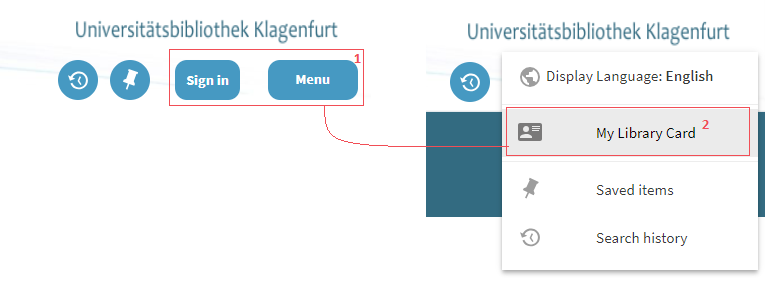
Screenshot Surf Online Help 01

NOTE: Write your user name in small letters!

The following options are only available when registered:

  • Order items from closed stacks
  • Renew loan period
  • Cancel requests
  • Resource sharing
  • Save your favourites
  • Save and subscribe to your search requests
  • Change language permanently

Without registration, your favourites, search requests and language choice are only saved for your current browser session. To protect your account from access by other users, please cancel registration when ending a session.

NOTE: If you are registered in the campus system, you are automatically registered in the library system as well.

To use your library account, you must register at My Library Card. Your loans, orders and reservations as well as fines, reminders, messages or personal settings, are listed.
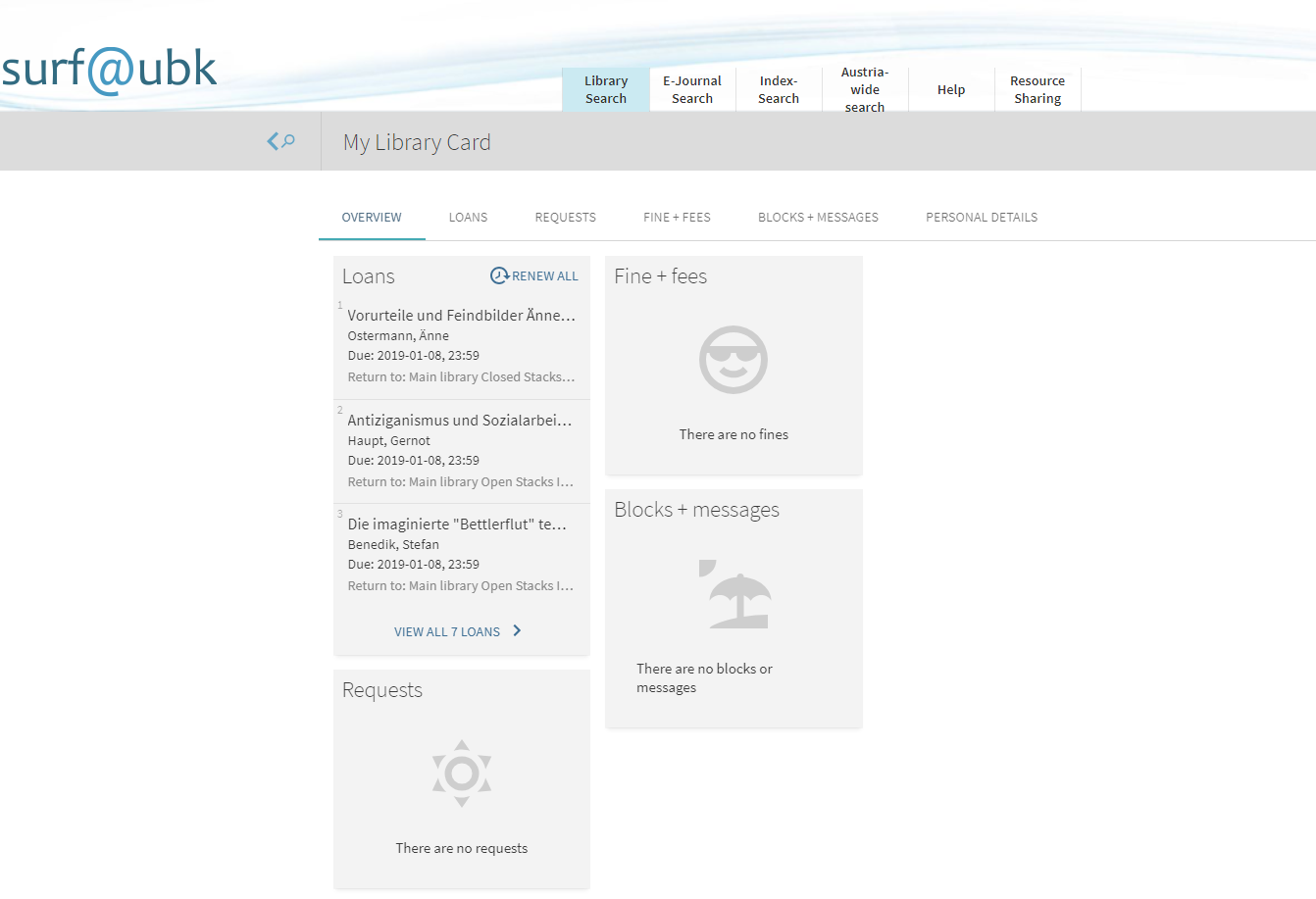
Screenshot Surf Online Help 02

Renew borrowing period

Your account shows your current borrowings (My Library Card -> Loans); conditions of borrowing permitting, you can renew these individually or comprehensively.
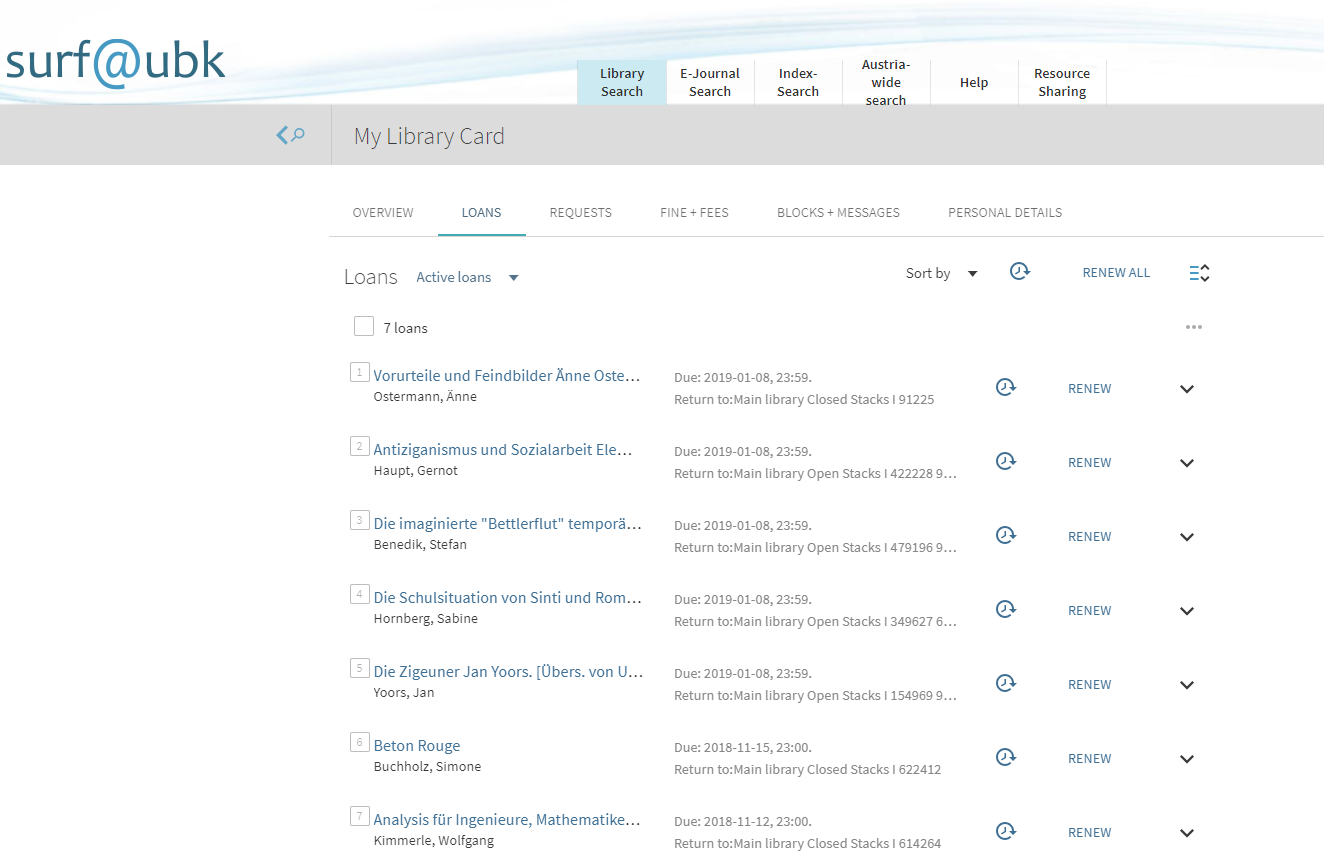
Screenshot Surf Online Help 03

NOTE: a new borrowing period is valid instantly. If you renew it for items before their return date, the maximum extension period is shortened accordingly.

Change language

Click Menu to change language for current session.
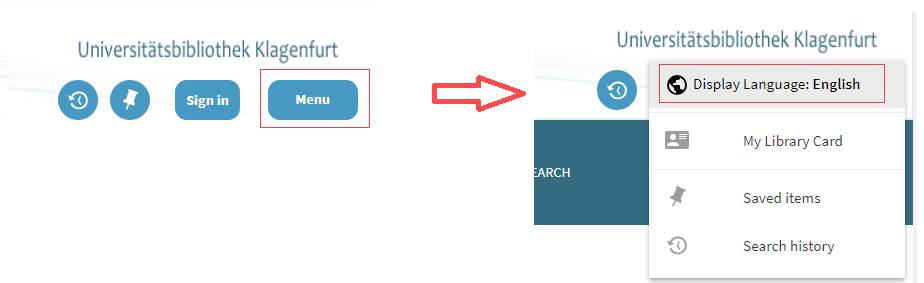
Screenshot Surf Online Help 04

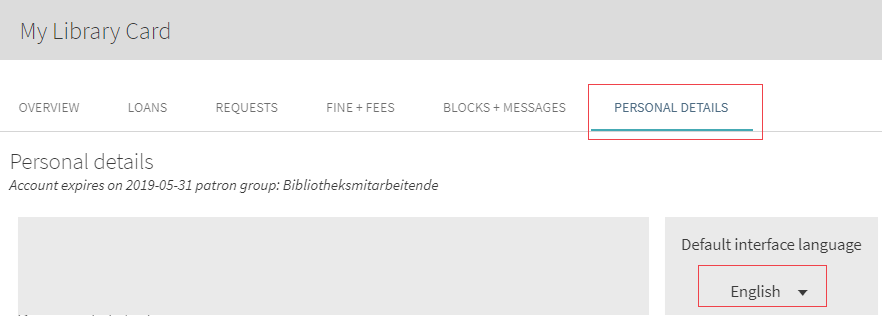
If you are registered, you can access your library account (My library Card); at PERSONAL DETAILS, you can change language permanently.
Screenshot Surf Online Help 05

Search in surf@ubk

How do I search in surf@ubk?

The following tabs are at your disposal for your research:

Online catalogue

Look here for printed books, magazines, articles and other licensed media in our stock as well as for electronic full texts (e.g., e-books) licenced to the university.

Online catalogue & more

With only one search request, you have our stock as well as numerous data bases and e-journals with full text or literature quotations in books or magazines at your disposal. In addition, an article database is searched, containing millions of bibliographical records, books excerpts and reviews.

NOTE: Please note that not all databases and e-journals can be searched using surf@ubk. This concerns, among others, law journals and data bases as well as WISO data bases. Access to these resources only on our homepage, section OFTEN SEARCHED, Databases (DBIS).

NOTE: You can access hits in licenced databases only if you are within the university’s IP range. AAU staff and students can access online resources from other locations if they register the university’s proxy server in their browser.

For every tab, there is Library Search and Advanced Search.

Library Search

Library search searches all possible search areas, including existing full text, for the keyword entered. If you use Library search, you only need to write one or several words onto the tab and click the Search-button.

Ex: London as search keyword finds all books about London as well as books published in London.

Advanced Search

In Advanced search, you can specify the areas to be searched (e.g., search for author, words in title, aso). In addition, you can limit your search using specific criteria (e.g., publication period, type of item or language).

Search area

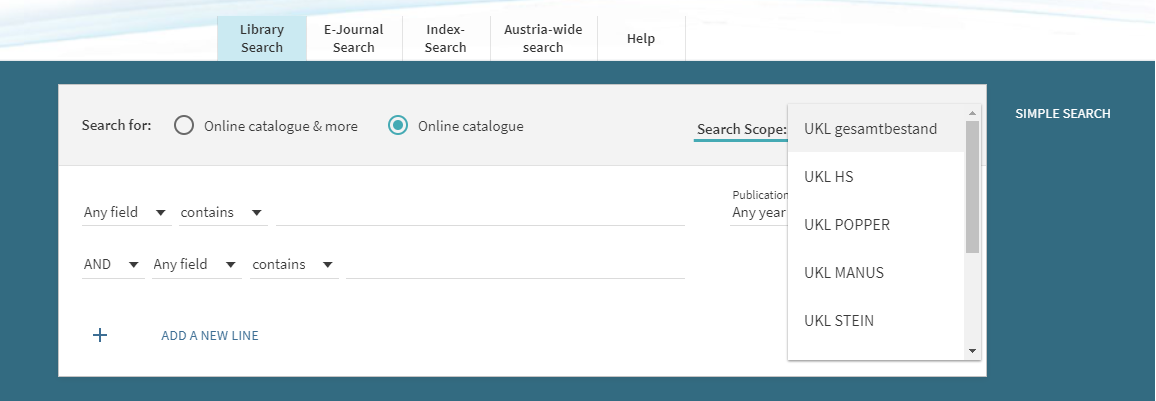
In the tab Library Search, you decide which data holdings are to be searched. The complete library catalogue is searched automatically. You can change the search area by choosing a specific search area in the area input mask.

Ex: in Library Search, you can define the search area like this:
Screenshot Surf Online Help 06

Using Boolean operators

You can use the Boolean operators AND, OR and NOT (resp. UND, ODER and NICHT) in your search request. Please use capitals, otherwise surf@ubk regards “and”, “or”, and “not” as part of the search request and not as operators.

NOTE: If you don’t use Boolean operators, a logical AND connection between words is assumed, i.e., surf@ubk is looking for all entered words simultaneously.

Search for specific words or phrases

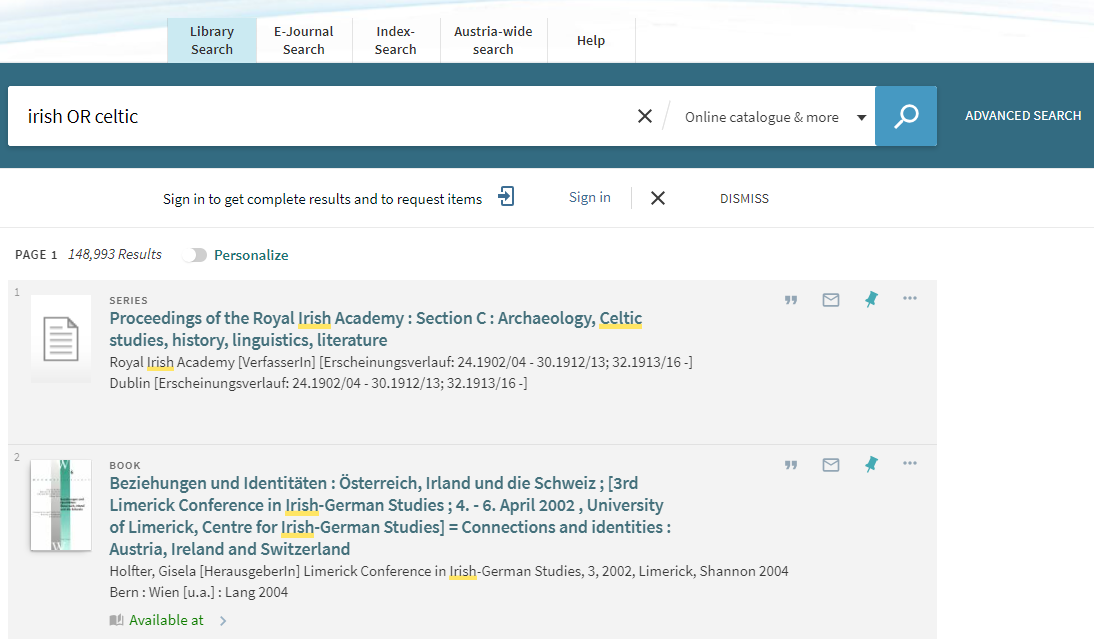
You can search for titles containing at least one of the words or phrases entered into the search box. Use Boolean operator OR (or ODER) between words or phrases.

Ex: To search for titles containing the word irish or the word celtic, enter the following:
Screenshot Surf Online Help 07

Excluding words or phrases

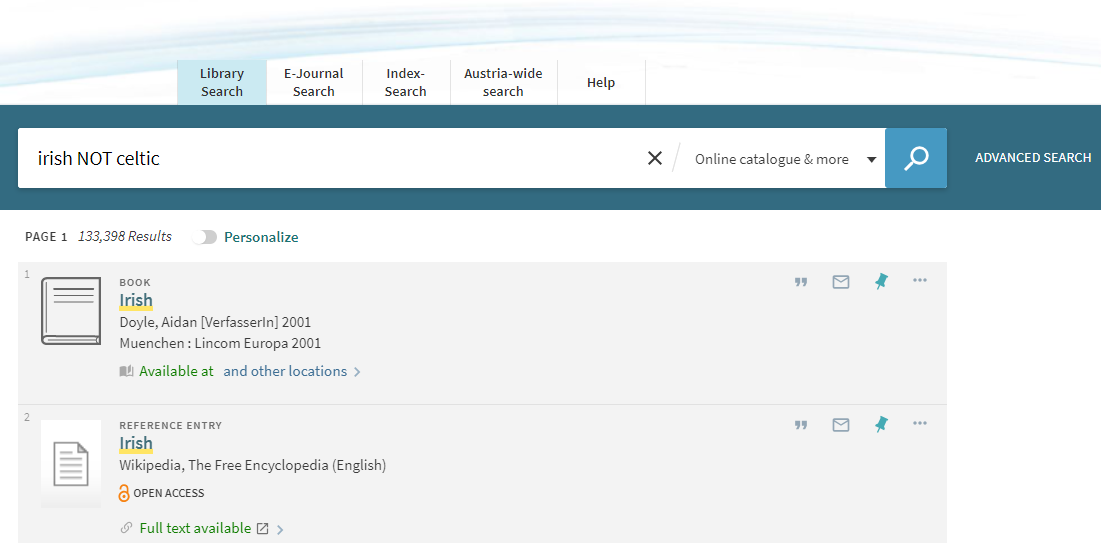
You can search for titles containing a specific word or phrase while at the same time excluding another word or phrase. Use Boolean operator NOT (or NICHT) between words or phrases.

Ex: To search for titles containing the word irish but not the word celtic, enter the following:
Screenshot Surf Online Help 08

Searching with wildcards

You can use the following wildcards for your search:

? –  replaces a single letter: enter wom?n to search for woman, women, aso.

*– replaces several letters: enter cultur* to search for culture, cultures, cultural, culturally.

Grouping keywords within a search request

To group keywords within a search request, put them in brackets.

Ex: To search for Shakespeare and tragedy or sonnet, enter the following:
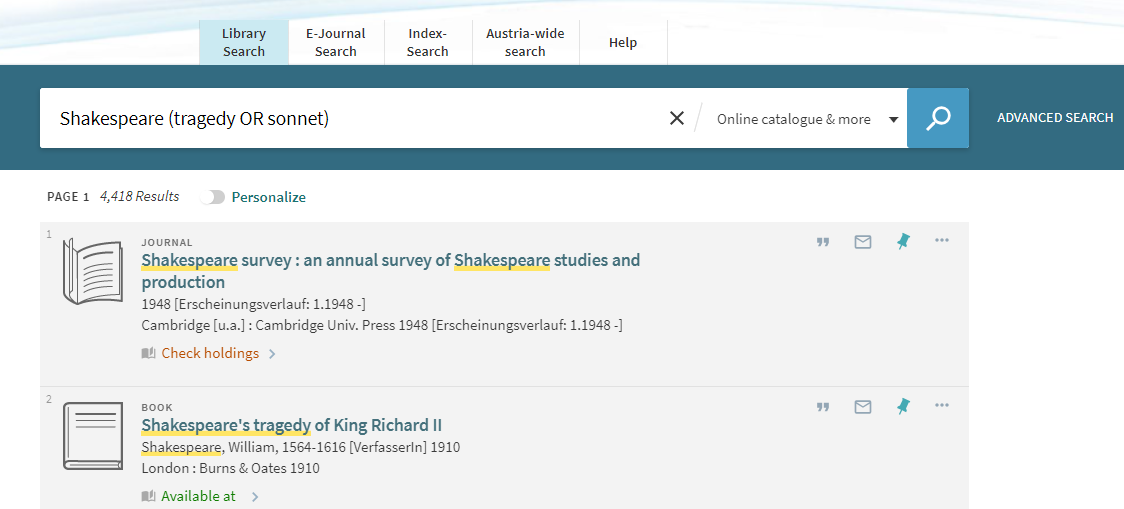
screenshot surf Online Help 09

List of results

With a click on a title, you can choose between the following options:

  • View it: link to online version of title
  • Locations: shows locations, borrowing information, request options: Order/Request
  • Details: more information about title
  • Links: e.g., links to table of contents, earlier/later titles, all volumes of series
  • Virtual Browse: shows literature with the same topic
  • Send to: to export title information to literature administration programme, to print, to send as email, to export quotation or permanent link to title

Additional functions

How do I find an item’s location?

Click the Sign in button. Valid borrowing information is shown only when registered. After successful search, click title or availability of specific item.
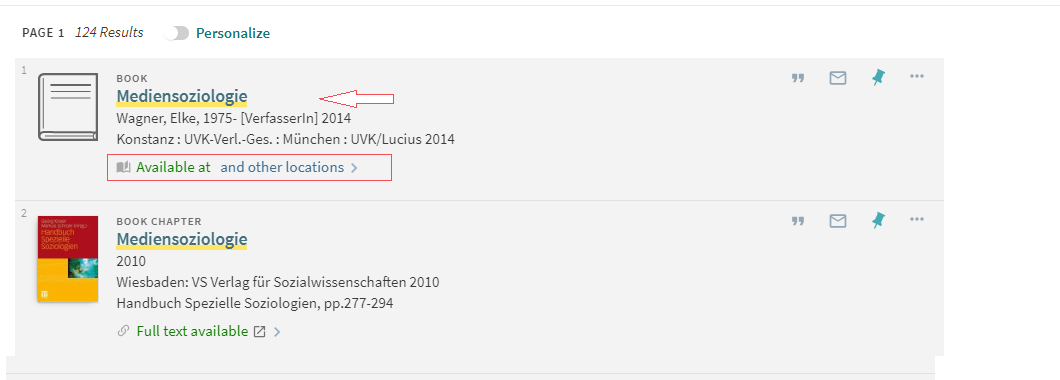
Screenshot Surf Online Help 10

Detailed information for relevant title opens.

The Locations box shows location(s):
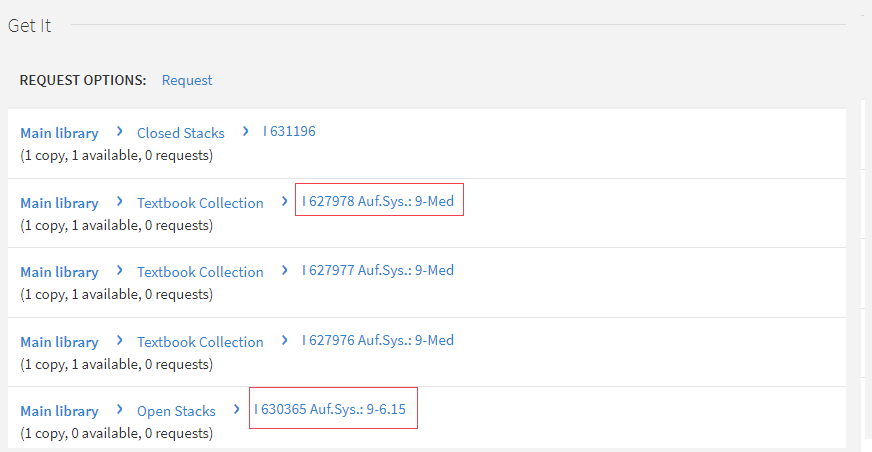
Screenshot Surf Online Help 11

If an item is in the reading rooms (e.g., open stacks or textbook collection), please make a note of the classification system (“Auf.Sys.”) and the call number (e.g., I 630365). This information leads you to the item. Clicking on the item itself gives you more information:

  • Borrowing period resp. Not loanable – depending on your borrowing conditions
  • Is item in place or on loan  (incl. return date)
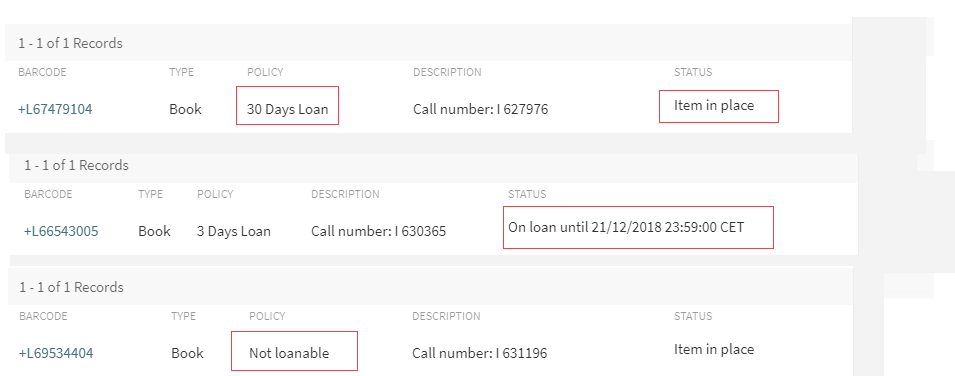
Screenshot Surf Online Help 12

How do I order books from the closed stacks resp. how do I reserve them?

Click Register button. You can only reserve items when registered. Use same procedure as in How do I find an item’s location?  To order an item, click the Order/Request link next to Request options.
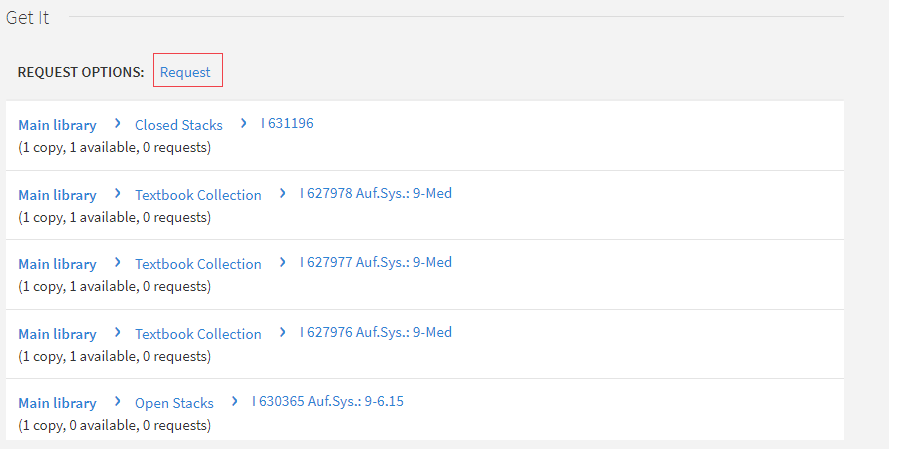
Screenshot Surf Online Help 13

You are now shown the collection point. To complete process, click Order/Request again.
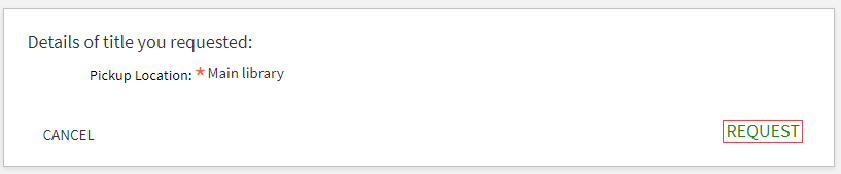
Screenshot Surf Online Help 14

Now you receive information about the time span your item is held for you at the loan desk; or, in case of no item available, your position in the queue (available items on position 0).
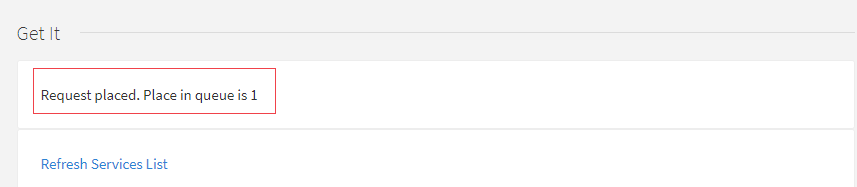
Screenshot Surf Online Help 15

When reserved item is at loan desk, you are notified by E-mail!

What is the fastest way to full text in an E-journal article (LibKey)?

Klagenfurt UL has licenced LibKey/BrowZine, a software solution to facilitate and speed up access to E-journals and their articles for its users.

All information at: LibKey – BrowZine

How do I use inter-library loan?

If Klagenfurt UL doesn’t have an item you need, please use the Austria-wide search. Make a note of the title data and return to our system. You can only use inter-library loan when registered.

When logged in, choose Ressource Sharing in main menu. The relevant online form for inter-library loan is now accessible.

Screenshot Surf Online Help 16

Please choose item – book or article – and fill in all boxes marked with a red asterisk (title, author, aso). Don’t forget from which library you want to order (source) and the relevant call number!

You usually find this information under “Location” in the catalogue of the library you have chosen in the Austria-wide search.

To complete order process, please read information in form and agree to conditions by ticking the box. The Order for a fee button starts the ordering process.
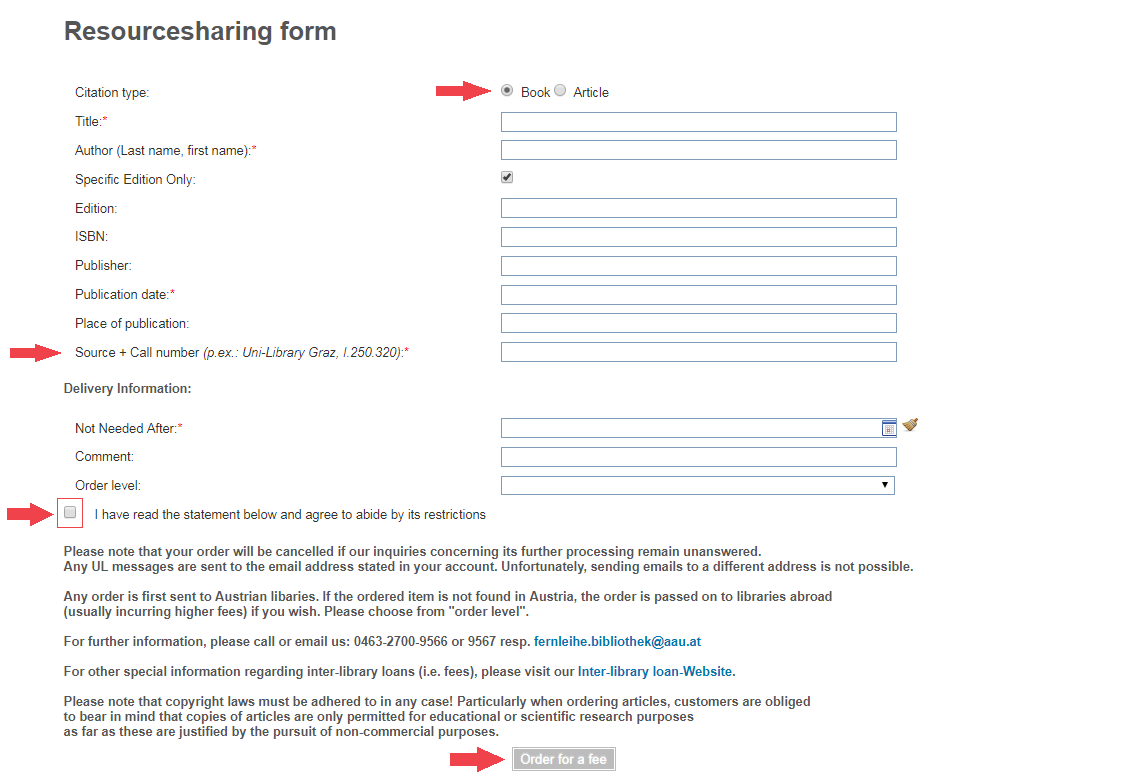
Screenshot Surf Online Help 17

Further information regarding inter-library loan on our website: Inter-library loan

What is the Klagenfurt UL File Viewer?

A file viewer enables you to look at files, e.g., PDF documents. The UL File Viewer can open and show a file that hasn’t been completely downloaded yet. Most standard File Viewers in web browsers (e.g., Internet Explorer, Chrome, Safari, aso) only show files once they are completely downloaded. AAU Klagenfurt UL is working on expanding its digital holdings. This process makes more holdings accessible online. Due to the number of pages and photo resolution, digital copies are usually very big files. UL File Viewer enables you to look at the first pages of the document sooner. While the first pages are shown, UL File Viewer continues to download the rest of the document in the background.

Screenshot Surf Online Help 18

Apart from speed, Klagenfurt UL File Viewer also offers:

  • Zoom
  • Full text search
  • Data structure information

Screenshot Surf Online Help 19

What is BibTIp?

BibTip is a recommendation service expanding the functionalities of surf@ubk. BibTip offers recommendations based on the search behaviour of other surf@ubk users. The recommendations offered are specific for Klagenfurt UL catalogue and link directly with existing data in surf@ubk.

BibTip’s recommendations are shown as an additional tab for individual hits:
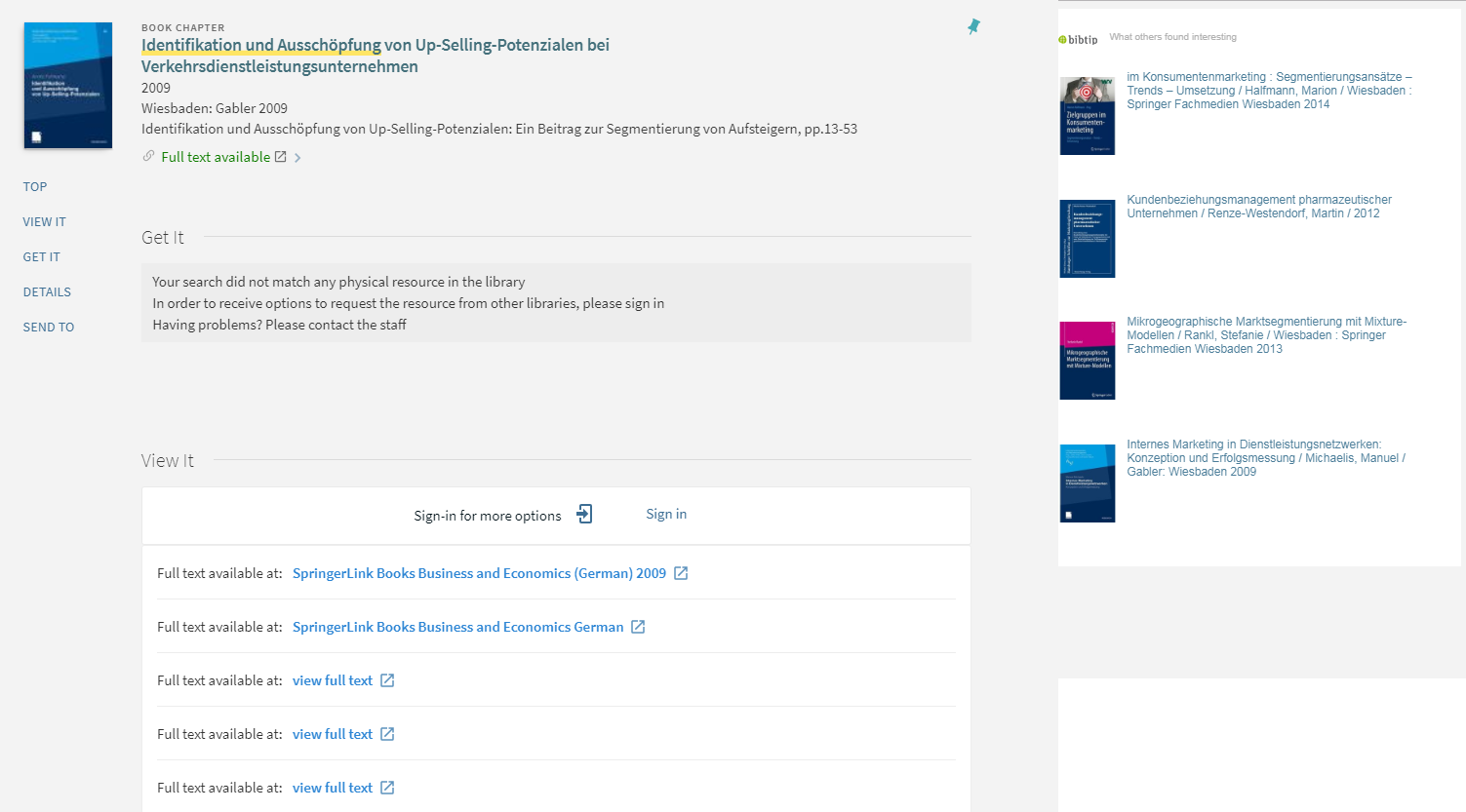
Screenshot Surf Online Help 20

The Karl-Popper Archives

Books from the Karl-Popper Archives can’t be borrowed on principle. If you are interested in a book from this collection, please check first if there are editions in the UL holdings (open/closed stacks). If this is not the case, and if you have questions regarding the Karl-Popper Archives, please click hier.

Report link fault

A button added to surf@ubk allows you to report e-resources with link faults to the library team while searching.

Bibliothekskatalog (Surf) Feedback-Tool_1

The button is always located bottom right of the monitor.

It opens a dialogue box to describe and report the problem.
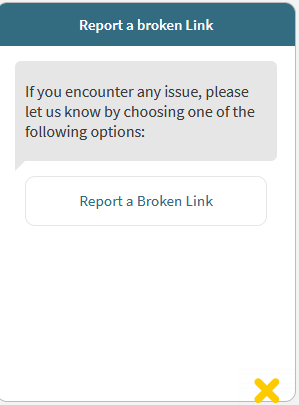
Screenshot Surf Feedback-Tool 1

Your E-mail address is necessary because this is a mail-based functionality.
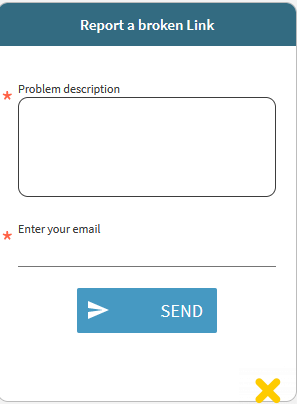
Screenshot Surf Feedback-Tool 2

Klagenfurt UL’s E-book team ebooks [dot] bibliothek [at] aau [dot] at will attend to incoming E-mails.

Thank you for your support

Videotutorials

First steps in surf@ubk

Video-Tutorial First steps

Ordering copies from the closed stacks

Video-Tutorial Ordering copies

University publications

University publications without free online access

The university publication in question is without free online access, but it can be accessed at the kiosk PC in the “non-rest/course lounge” area (level 2). Look for further information at: university publications

  • University Library Klagenfurt
    • News
    • Profile & contact
    • Feedback
    • Team
    • Literature search
      • Accessing electronic media
      • University publications
      • E-Books
      • Databases
      • Electronic journals
      • Electronic journals – Overview
        • LibKey / BrowZine
        • Electronic journals
      • Open Access
      • Course reserve
      • Suggestion book
    • Use & service
      • Bibliometrics
      • 24/7 library
        • Terms of use of the 24/7 library
      • Academic staff
      • Accessibility Services
        • Workspace for blind and visually-impaired library users
        • Information for students
        • Information for lecturers
        • Accessible media
      • Account & self-registration
        • Self-registration for non-members
        • Services for non-members
          • Access to 24/7 library
          • Printing and copying for non-members of the university
          • Use of PC work stations (access to E-resources)
      • Borrowing
      • Copying, printing & scanning
      • External users
      • Forms
      • Graduates (alumni/alumnae)
      • Inter-library loan
      • Learning & working areas
        • Room-booking system (help)
        • Terms of use
      • Lockers for library users
      • School pupils
      • Social media
      • Tours & trainings
        • Tours of the rare book collections
        • First steps in Citavi
        • Library basics
        • Research advanced – tools and techniques
        • Supervised database & internet research
        • Tours for school pupils
    • Teaching library
      • surf@ubk Online Help
    • Rare book collections
      • Treasures at the university library
      • Collection of manuscripts
      • Printed writings
      • Goess library
      • Buttinger collection
      • Broch library
      • Artist’s books
      • Ex libris
      • European Documentation Centre (EDC)
    • The Karl Popper Archives
      • The works of Karl Popper and his library
      • The collection of bibliophile prints
      • Additional indexes
      • The literary estate of Karl Popper
    • Ingeborg Bachmann Library
      • Exhibitions at the IBB
      • Ingeborg Bachmann
      • Collections of the IBB
    • Overview

Quicklinks

  • Webmail
  • University bulletin
  • Library
  • Bulletin Board
  • Staff Search
  • Campus Map
  • IT Services (ZID)
  • USI
  • OEH Klagenfurt
  • Index A-Z

Portals

  • Campus System
  • Student Cockpit
  • Staff Portal
  • Moodle
  • Facebook
  • Bluesky
  • LinkedIn
  • Youtube
  • Instagram
  • TikTok
Siegel der Alpen-Adria-Universität Klagenfurt

Information for

  • Pupils
  • Alumni & Career
  • Prospective Students
  • Continuing Education
  • Researchers
  • Students
  • Staff
  • Teaching Staff
  • Partners & Sponsors
  • International

Address

University of Klagenfurt
Universitätsstraße 65-67
9020 Klagenfurt am Wörthersee
Austria

+43 463 2700
uni [at] aau [dot] at
www.aau.at
Campus Plan

Gütesiegel evalagZertifikat 2024: Vielfalt gestalten. Diversity Audit des StifterverbandsGütesiegel Betriebliche GesundheitsförderungEMAS SiegelSatisfaction Award 2023Satisfaction Award 2021Gütezeichen hochschuleundfamilieGütezeichen EqualitaAACSB accredited

© University of Klagenfurt
  • Legal notice
  • Privacy policy
  • Responsible disclosure
  • Whistleblowing
  • Accessibility
  • Web team

Your privacy is important to us!


This website uses cookies to ensure the basic functionality of our website. We also use Cookies cookies to optimally redesign our website and to improve it continuously for you. For this purpose, it is necessary to pass on information to the respective service providers. By clicking on the "Accept all cookies" button, you agree to the use of cookies.
You can subsequently modify your preferred settings at any time under "Manage settings".
For further information on the cookies used, please refer to our privacy policy.

Manage settingsAccept all cookies

Cookie and Privacy Settings


How we use cookies

We use cookies to optimally redesign our website and to improve it continuously for you.
Click on the different category headings to view further information and to change the default settings.
Please note that refusing some cookies may affect the way our website works. Web pages may not be displayed correctly and may not function properly.

Notice regarding the processing of your data collected on this website in countries without adequate data protection standards:
By clicking on ‘Accept all cookies’, you consent to the transfer of your personal data to providers in third countries (e.g. the USA) in accordance with Art. 49 (1) lit. a GDPR. These providers (e.g. Google, Facebook, LinkedIn, Twitter, YouTube) may not be subject to a level of data protection equivalent to that of the EU. The data will only be transferred with your express consent.

Essential Cookies & Cookie Notice

Essential cookies

These cookies are strictly necessary for the functioning of the website. Essential cookies enable basic functions and are necessary for the proper functioning of the website. You can set your browser to block these cookies or to notify you about these cookies. However, some parts of the website may not work as expected.
These cookies do not store any personal data.


Hiding the cookie notice

Two cookies are required for this setting to be saved. Otherwise this hint will be displayed again every time the page is loaded.

Google Tag Manager

We use tracking and analysis tools to ensure continuous optimisation and needs-based design of our website. Tracking measures also enable us to record statistics regarding the use of our website by visitors and to develop our website further on the basis of these findings.
If you do not want Google and Facebook to track your use of our website and transmit your visits, you can disable tracking in your browser here:

Other external services

We also use other external services including Google Webfonts, Google Maps, and external video providers.
Since these providers may collect personal data such as your IP address we allow you to block them here.
Please be aware that this might significantly limit the functionality and appearance of our site. Changes will take effect once you reload the page.
Google Webfont Settings:

Google Maps Settings:

Google reCaptcha Settings:

Vimeo and Youtube video embeds:

Privacy policy

For further information on the cookies used, please refer to our
Privacy Policy of the University of Klagenfurt

Save and accept selectionCancel
Open Message Bar Open Message Bar Open Message Bar
Scroll to top